How to setup versioning in the PowerShell build release pipeline?
This blog is part of a series of blog about “Creating PowerShell modules with Azure Devops.“
Not only do you need to release modules into the wild you also need to track the versioning of those modules you are releasing. The versioning of releases is split up into three different numbers:
- [int]$Major
- [int]$Minor
- [int]$Build
To start with the latest two, these are both automatically generated by the script. The Build versioning is always updated whenever the build pipeline is runnend. The Minor version will be updated whenever there is a public script added to the module directory.
Major number
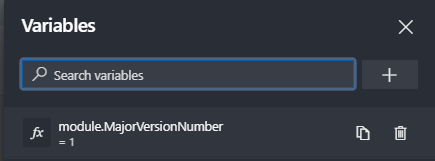
The major number is the one you specified yourself. This needs to be done with a variable in the build pipeline. It will validate the number with the released number.
module.MajorVersionNumber